
UK and EUR Account Charge
Learn how to collect payment directly from your customer's bank accounts in the UK and Europe
Getting Started
We recommend checking out the introductory section to understand the basics of direct charge first. This guide assumes you’ve read that.
Pay with Bank Account (PWB) allows your customers to pay directly from their bank accounts. Flutterwave supports EUR and GBP payments using this payment method.
When you initiate a charge, an authorization URL is returned that redirects the customer to the Nuvion checkout, where they select their bank and authorize the payment using their banking app.
For EUR payments, you can optionally provide the customer's billing_country to show banks available in that country without requiring the customer to select their country first.
This payment method does not support recurring payments.
Approval Required
Your account must be enabled to receive payments from UK and European bank accounts. Contact [email protected] to request for approval.
Supported Countries
This payment method is supported for customers with bank accounts in the following countries:
| Code | Country |
|---|---|
| AT | Austria |
| BE | Belgium |
| GB | United Kingdom |
| DK | Denmark |
| EE | Estonia |
| FI | Finland |
| FR | France |
| DE | Germany |
| IE | Ireland |
| IT | Italy |
| LV | Latvia |
| LT | Lithuania |
| NO | Norway |
| PL | Poland |
| ES | Spain |
| SE | Sweden |
| NL | Netherlands |
| PT | Portugal |
Payment Flow
Charging a EUR/GBP bank account involves three steps:
- Initiate a charge.
- Redirect the customer.
- Handle the transaction.
Step 1: Initiating a charge
Initiate a charge with the following parameters. See the API reference for other optional parameters.
tx_ref: A unique reference to track the transaction.amount: The amount to charge the customer.currency: The transaction currency. PassGBPorEUR.email: The customer's email address.redirect_url(Optional): The URL to redirect the customer to after completing payment.billing_country(Optional): The customer’s billing country. ForEURpayments, pass the two-letter code of a supported country to show banks available in that country directly during checkout.
# UK account
curl --request POST \
   --url https://api.flutterwave.com/v3/charges?type=account-ach-uk \
   --header 'Authorization: Bearer YOUR_SECRET_KEY' \
   --header 'content-type: application/json' \
   --data '{
       "amount": 100,
       "email": "[email protected]",
       "tx_ref": "Your-Unique-Reference",
       "currency": "GBP",
       "redirect_url":"https://developer.flutterwave.com"
}'
# European account
curl --request POST \
   --url https://api.flutterwave.com/v3/charges?type=account-ach-uk \
   --header 'Authorization: Bearer YOUR_SECRET_KEY' \
   --header 'content-type: application/json' \
   --data '{
       "amount": 100,
       "email": "[email protected]",
       "tx_ref": "Your-Unique-Reference",
       "currency": "EUR",
       "redirect_url":"https://developer.flutterwave.com",
       "billing_country":"FI"
}'
The response contains a pending status and includes a redirect URL in meta.authorization.redirect.
{
    "status": "success",
    "message": "Charge initiated",
    "data": {
        "id": 10460192,
        "tx_ref": "MC-D1kFdFJKJT1F341lwkk1",
        "flw_ref": "TVPU7256178793868804767579",
        "device_fingerprint": "N/A",
        "amount": 100,
        "charged_amount": 102,
        "app_fee": 5,
        "merchant_fee": 0,
        "processor_response": "Pending user action",
        "auth_model": "NUVION_ACH",
        "currency": "GBP",
        "ip": "34.254.131.32",
        "narration": "Account UK Transaction FOR Dotuns Fashion Limited",
        "status": "pending",
        "payment_type": "account-ach-uk",
        "fraud_status": "ok",
        "charge_type": "normal",
        "created_at": "2026-08-28T17:38:07.000Z",
        "account_id": 92319,
        "customer": {
            "id": 3605856,
            "phone_number": null,
            "name": "Dotuns Fashion Limited",
            "email": "[email protected]",
            "created_at": "2026-08-28T17:38:06.000Z"
        }
    },
    "meta": {
        "authorization": {
            "mode": "redirect",
            "redirect": "https://ravesandboxapi.flutterwave.com/flwv3-pug/getpaid/api/short-url/e8d711f6-6577-4102-9ca2-d68ce1ac79ed"
        }
    }
}
Step 2: Redirect The Customer
Redirect the customer to the redirect URL to authorize the charge.
The checkout experience differs based on the currency passed:
GBP payments:
The customer is taken to the Nuvion checkout to select their bank and authorize the payment.
EUR payments :
If billing_country is not provided, the customer first selects their country, and then selects their bank. If provided, the customer is taken directly to the Nuvion checkout with the banks available in that country.
Step 3: Handling the Transaction Webhooks
After the customer completes the authorization flow, Flutterwave sends a webhook with the updated transaction status.
{
  "event": "charge.completed",
  "data": {
    "id": 10460192,
    "tx_ref": "MC-D1kFdFJKJT1F341lwkk1",
    "flw_ref": "TVPU7256178793868804767579",
    "device_fingerprint": "N/A",
    "amount": 100,
    "currency": "GBP",
    "charged_amount": 102,
    "app_fee": 5,
    "merchant_fee": 0,
    "processor_response": "Approved Or Completed Successfully",
    "auth_model": "NUVION_ACH",
    "ip": "34.254.131.32",
    "narration": "Account UK Transaction FOR Dotuns Fashion Limited",
    "status": "successful",
    "payment_type": "account-ach-uk",
    "created_at": "2026-08-28T17:38:07.000Z",
    "account_id": 92319,
    "customer": {
      "id": 3605856,
      "name": "Dotuns Fashion Limited",
      "phone_number": null,
      "email": "[email protected]",
      "created_at": "2026-08-28T17:38:06.000Z"
    }
  },
  "event.type": "ACCOUNT-ACH-UK_TRANSACTION"
}
Use the webhook to determine whether the payment was successful before fulfilling the customer's order or service.
You can also verify the transaction using the transaction verification endpoint . For more information about receiving and handling webhooks, see our Webhooks guide.
Testing Your Integration
Test your Pay with Bank integration in test mode without moving real funds.
-
Initiate a charge and open the returned
meta.authorization.redirectURL. -
Complete payment and select a bank.
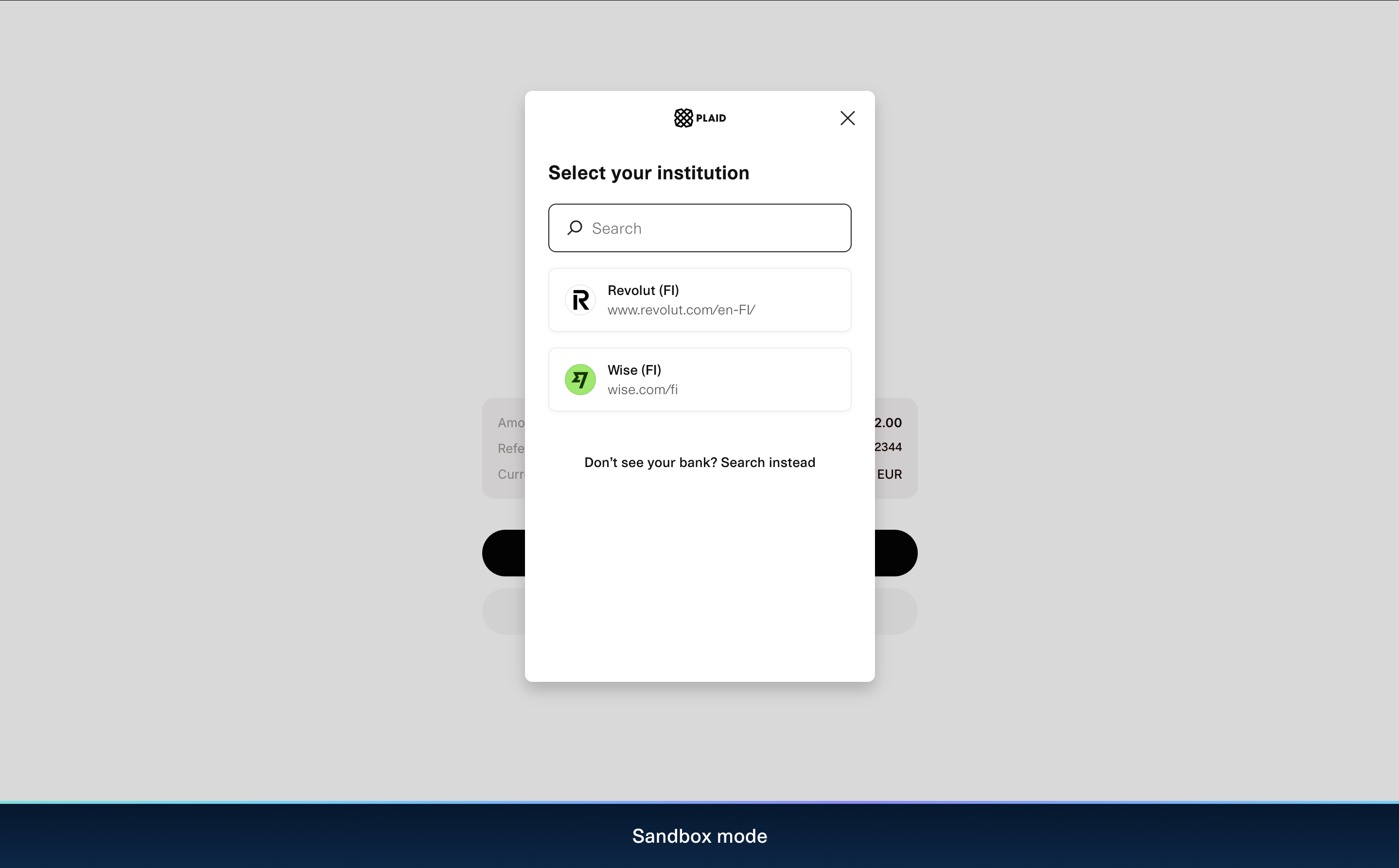
-
You are redirected to the sandbox page to simulate different outcomes.
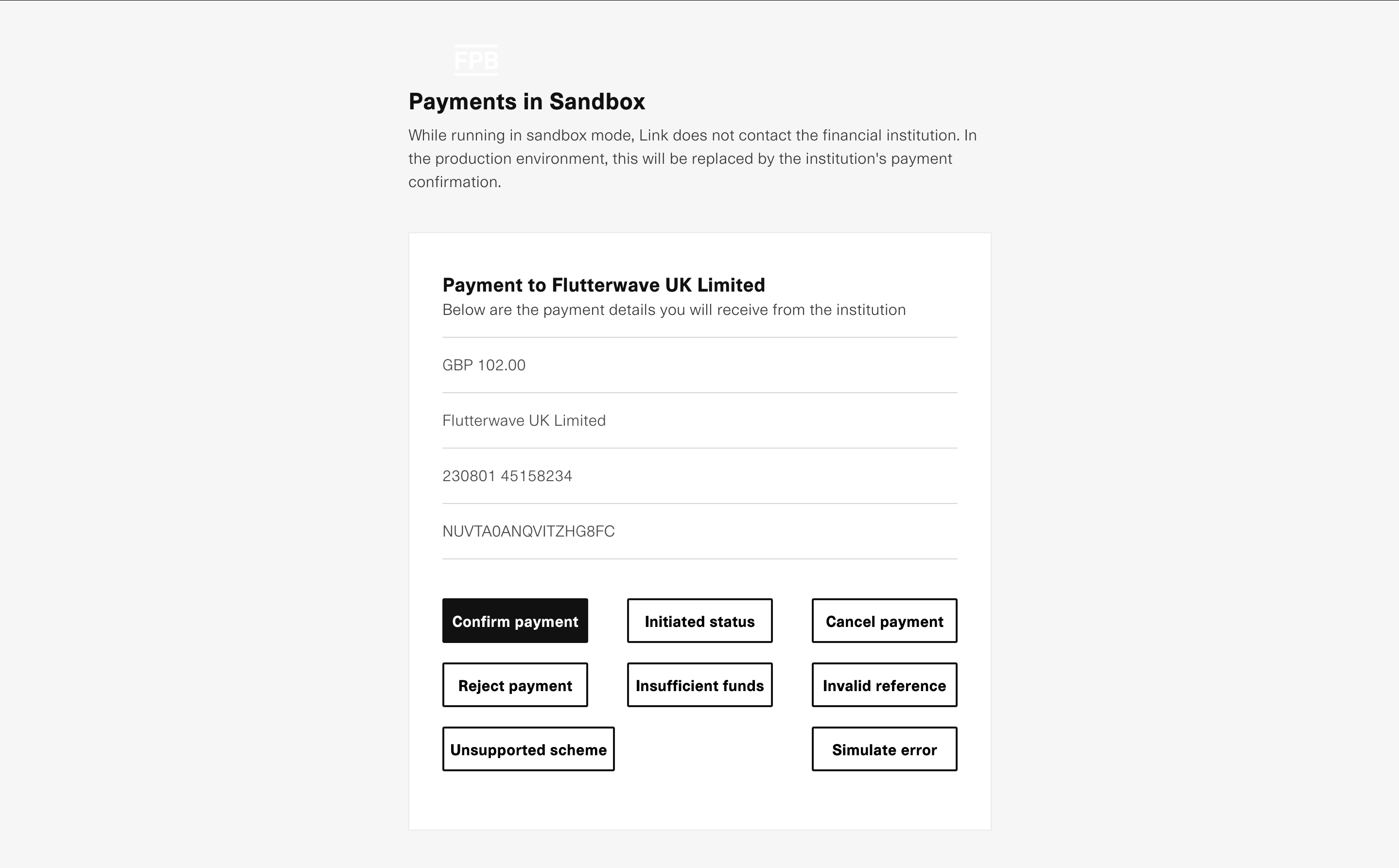
- Select Confirm payment to simulate a successful payment.
- Click Go back home to redirect to your
redirect_url, then verify the transaction using webhooks or the transaction verification endpoint.
Next Steps
Congrats on your successful integration. Before accepting live payments, review our recommended Best Practices.
Updated 5 days ago