
Bank Account Verification
Learn how to resolve customer’s account details for Nigerian Banks only.
This feature supports Nigerian Bank Account Numbers, Ghanaian Bank Account Numbers, Ghanaian Mobile Money Numbers and Flutterwave Merchant ID.
It's important to verify your users' credentials before initiating payments or giving value. Flutterwave gives you the ability to verify some payment information through our resolve account details endpoint. These include:
- Nigerian Bank Account Numbers.
- Ghanaian Bank Account Numbers.
- Ghanaian Mobile Money Numbers.
- Flutterwave Merchant ID.
To do this, you provide us with your customer's information, and we'll return the account name.
| Parameter name | Definition | Format | Example | Required |
|---|---|---|---|---|
account_bank | The Customer's Bank code. See the full list of bank codes here . | String | 044 | Yes |
account_number | The Customer's Bank account number. For mobile money, pass the Customer's mobile number instead. | String | 0690000034 | Yes |
country | ISO-2 country code e.g. GH. | String | GH | No |
Here's an example with our SDKs:
// Install with: npm i flutterwave-node-v3

const Flutterwave = require('flutterwave-node-v3');
const flw = new Flutterwave(process.env.FLW_PUBLIC_KEY, process.env.FLW_SECRET_KEY);
const details = {
  account_number: "0690000032",
  account_bank: "044"
};
flw.Misc.verify_Account(details)
  .then(response => console.log(response));
// Install with: composer require flutterwavedev/flutterwave-v3
$flw = new \Flutterwave\Rave(getenv('FLW_SECRET_KEY')); // Set `PUBLIC_KEY` as an environment variable
$accountService = new \Flutterwave\Misc();
$details = [
"account_number" => "0690000032",
"account_bank" => "044"
];
$response = $accountService->verifyAccount($details);# Install with: gem install flutterwave_sdk
require 'flutterwave_sdk'
flw = Flutterwave.new(ENV["FLW_PUBLIC_KEY"], ENV["FLW_SECRET_KEY"], ENV["FLW_ENCRYPTION_KEY"])
misc = Misc.new(flw)
details = {
account_number: "0690000032",
account_bank: "044"
}
response = misc.resolve_account details
print response# Install with: pip install rave_python
import os
from rave_python import Rave
rave = Rave(os.getenv("FLW_PUBLIC_KEY"), os.getenv("FLW_SECRET_KEY"))
details = {
"account_number": "0690000032",
"account_bank": "044"
}
response = rave.Transfer.accountResolve(details)
print(response)// Install with: go get github.com/Flutterwave/Rave-go/rave
import (
"fmt"
"os"
"github.com/Flutterwave/Rave-go/rave"
)
var r = rave.Rave{
false,
os.Getenv("FLW_PUBLIC_KEY"),
os.Getenv("FLW_SECRET_KEY"),
}
var transfer = rave.Transfer{
r,
}
details := rave.AccountResolveData {
RecipientAccount: "0690000034",
DestBankCode: "044",
PublicKey: r.GetPublicKey(),
}
err, response := transfer.ResolveAccount(details)
if err != nil {
panic(err)
}
fmt.Println(response)curl --location 'https://api.flutterwave.com/v3/accounts/resolve' \
--header 'Authorization: Bearer {{YOUR_SECRET_KEY}}' \
--header 'Content-Type: application/json' \
--data '{
"account_number": "0690000034",
"account_bank": "044"
}'If the account or mobile money number is valid, you'll receive a response with a status of "success", and the account details within the data key:
{
    "status": "success",
    "message": "Account details fetched",
    "data": {
      "account_number": "0690000032",
      "account_name": "Pastor Bright"
    }
}
If the account number is invalid, you'll get an error response:
{
  "status": "error",
  "message": "Sorry, that account number is invalid, please check and try again",
  "data": null
}Only test accounts can be verified on sandbox. Using an actual bank account in test mode would return an error.
{
  "status": "error",
  "message": "destbankcode/account_bank must be numberic and only 044 is allowed",
  "data": null
}
Resolving Flutterwave Merchant IDs
You can also use the account resolution endpoint with Flutterwave merchant IDs. This is helpful for verifying wallet details before starting a wallet-to-wallet transfer. To do this, use flutterwave as the account_code, and the merchant ID as the account_number.
Integration TipThe merchant ID is displayed on the merchant dashboard below the business name at the top left.
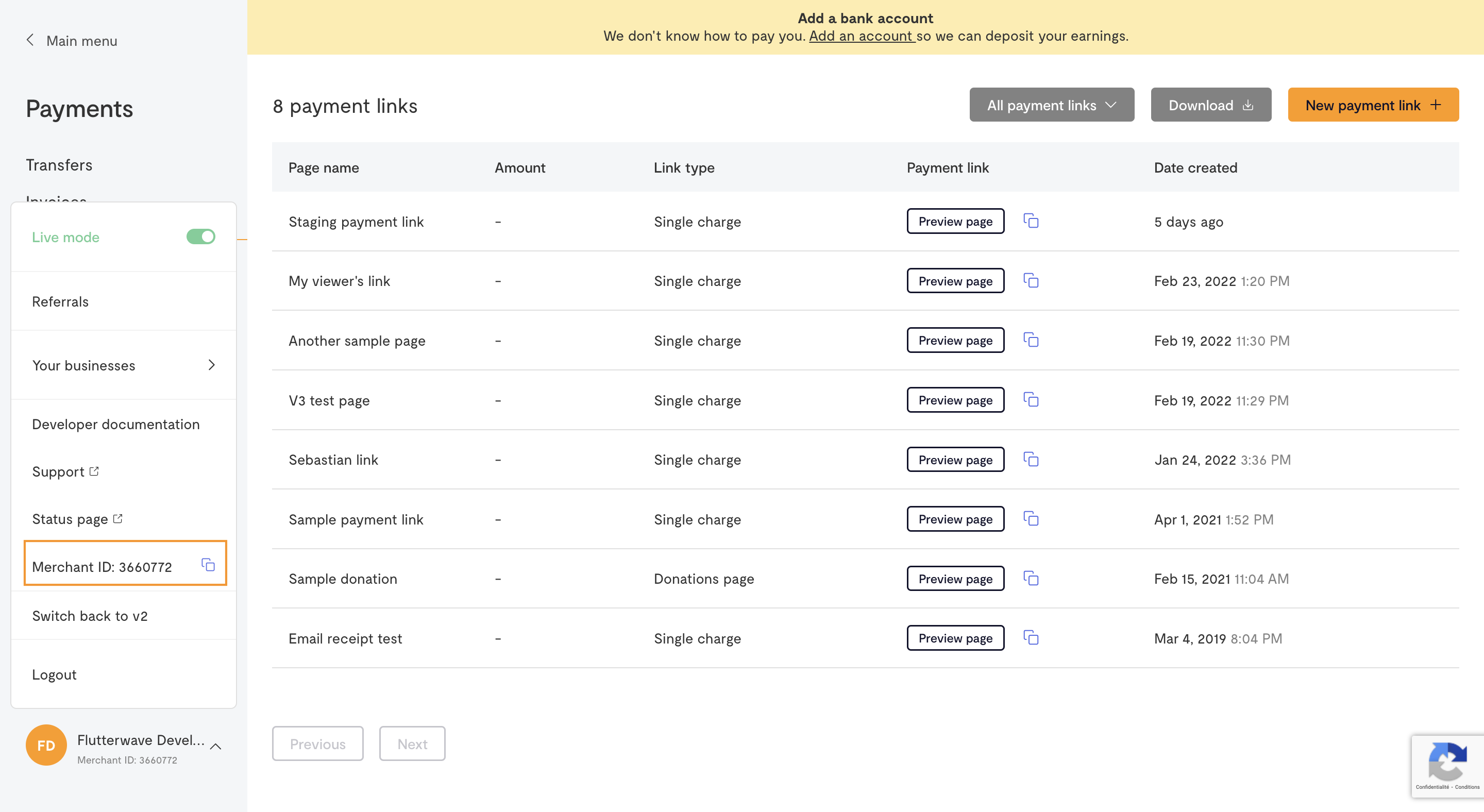
Sample request will look like this:
{
    "account_number": "7981223",
    "account_bank": "flutterwave"
}
Response will look like this:
{
  "status": "success",
  "message": "Account details fetched",
  "data": {
    "account_number": "7981223",
    "account_name": "Flutterwave Developer Account"
  }
}
Updated 13 days ago