
Stablecoins
Transfer funds to USDC, USDT & RLUSD wallets globally.
Stablecoins enable you to transact & hold digital currency globally using blockchain technology. Using this feature, customers can make transfers and complete transactions to and from their preferred wallet address.
New to stablecoins or blockchain technology? Read our introduction to wallets, transfers and crypto-based settlements here.
Using this feature, you can complete fiat-to-stablecoin or stablecoin-to-fiat conversions and make stablecoin-to-stablecoin transfers.
Supported Networks and Wallets
Flutterwave supports stablecoin payments across different currencies and networks. You need to match the correct currencies with the supported networks for a successful transaction.
| S/N | Supported Networks | Supported Currencies |
|---|---|---|
| 1 | SOLANA | USDT, USDC |
| 2 | ETHEREUM | USDT, USDC, RLUSD |
| 3 | BASE | USDC |
| 4 | POLYGON | USDT, USDC |
Transfer attempts to wallets on Tron, Stellar, or other similar networks will fail.
{
    "status": "error",
    "message": "Unsupported or unknown network specified.",
    "data": null
}
Quickstart
Let's configure your integration to make a quick USDC transfer to another address.
- Check your wallet balance and confirm that you have sufficient funds for the transaction. The
available_balanceis your balance for transfers.
curl --location --request GET 'https://api.flutterwave.com/v3/balances' \
--header 'Authorization: Bearer YOUR-SECRET-KEY' \
--header 'Content-Type: application/json' \
--data '{
    "service": "disbursement_customer_wallets",
    "service_method": "get",
    "service_version": "v1",
    "service_channel": "rave",
    "service_payload": {}
}'
{
"status": "success",
"message": "Wallet balances fetched",
"data": [
{
"currency": "USDC",
"available_balance": 0,
"ledger_balance": 0
},
{
"currency": "USDT",
"available_balance": 0,
"ledger_balance": 0
},
{
"currency": "NGN",
"available_balance": 37.53,
"ledger_balance": 0
},
{
"currency": "USD",
"available_balance": 0,
"ledger_balance": 0
}
]
}- Fund your stablecoin wallet by converting funds from your preferred fiat wallet(NGN, USD, GBP, EUR, or GHS).
curl --location 'https://api.flutterwave.com/v3/transfers' \
--header 'Authorization: Bearer YOUR-SECRET-KEY' \
--header 'Content-Type: application/json' \
--data '
{
    "account_bank": "flutterwave",
    "account_number": "10024361", // replace this with your Merchant ID.
    "debit_currency": "NGN",
    "amount": 1,
    "currency": "USDC"
}'
{
    "status": "success",
    "message": "Transfer Queued Successfully",
    "data": {
        "id": 254859,
        "account_number": 50537494,
        "bank_code": "flutterwave",
        "full_name": "Testing Settlement ",
        "created_at": "2026-01-23T08:03:34.000Z",
        "currency": "USDC",
        "debit_currency": "NGN",
        "amount": 1,
        "fee": 0.02,
        "status": "NEW",
        "reference": "e543beaedb80afc6",
        "meta": {
            "AccountId": 702952,
            "merchant_id": "00702952"
        },
        "narration": "Tada Tada",
        "complete_message": "",
        "requires_approval": 0,
        "is_approved": 1,
        "bank_name": "wallet"
    }
}
- Specify the recipient wallet and initiate the transfer. Cross-stablecoin transfers are not currently supported, e.g., sending USDC from your wallet to a USDT destination address.
curl --location 'https://api.flutterwave.com/v3/transfers' \
--header 'Content-Type: application/json' \
--header 'Authorization: Bearer YOUR-SECRET-KEY' \
--data '
{
    "account_bank": "POLYGON",
    "account_number": "0xd0c7XXXXXXXXXXXXXXXXXXXXXXXXXXXXXXXXXXX", //Specify the recipient's wallet address.
    "amount": 1,
    "currency": "USDC",
    "debit_currency": "USDC"
}'
{
    "status": "success",
    "message": "Transfer Queued Successfully",
    "data": {
        "id": 254858,
        "account_number": "0xd0c7XXXXXXXXXXXXXXXXXXXXXXXXXXXXXXXXXXX",
        "bank_code": "POLYGON",
        "full_name": "POLYGON0xd0c7XXXXXXXXXXXXXXXXXXXXXXXXXXXXXXXXXXX",
        "created_at": "2026-01-23T08:00:45.000Z",
        "currency": "USDC",
        "debit_currency": "USDC",
        "amount": 1,
        "fee": 0.03,
        "status": "NEW",
        "reference": "5e8312771aca2947",
        "meta": null,
        "narration": "Tada!",
        "complete_message": "",
        "requires_approval": 0,
        "is_approved": 1,
        "bank_name": "POLYGON"
    }
}
- Verify the transfer status.
curl --request GET \
     --url https://api.flutterwave.com/v3/transfers/26251 \
     --header 'Authorization: Bearer YOUR-SECRET-KEY' \
     --header 'Content-Type: application/json' \
     --header 'accept: application/json'
{
    "status": "success",
    "message": "Transfer fetched",
    "data": {
        "id": 2189051,
        "account_number": "0c7XXXXXxxXXxXr",
        "bank_code": "POLYGON",
        "full_name": "POLYGON0c7XXXXXxxXXxXr",
        "created_at": "2026-06-26T17:01:18.000Z",
        "currency": "USDT",
        "debit_currency": "USDT",
        "amount": 10,
        "fee": 1.5,
        "status": "SUCCESSFUL",
        "reference": "dfs23fh9_PMCKDU_1",
        "meta": [
            {
                "meta_name": "fee currency conversion",
                "from_currency": "USD",
                "from_amount": 1.5,
                "to_currency": "USDT",
                "to_amount": 1.5,
                "rate": 1
            }
        ],
        "narration": "From Dotuns Fashion Limited",
        "approver": null,
        "complete_message": "Successful",
        "requires_approval": 0,
        "is_approved": 1,
        "bank_name": "POLYGON"
    }
}
Prerequisites
To use this successfully, you must:
- Retrieve your API keys from your dashboard.
- Use an approved F4B account i.e. your account must be live and approved for production transactions.
- Ensure that your balance have enough funds for the transfers.
- Whitelist your IP addresses.
Wallet funding and Source wallets
To make successful transfers, you must have sufficient funds to complete the transactions. There are two ways to do this:
- Funding your USDT, RLUSD, or USDC wallet using either your NGN, USD, GHS, EUR, or GBP balance. Fund conversion from any other fiat balance would fail.
{
    "status": "error",
    "message": "We do not currently support this conversion. Please contact admin",
    "data": null
}
- Specify a fiat balance as your debit_currency when initiating your transfers. See example below.
curl --location 'https://api.flutterwave.com/v3/transfers' \
--header 'Content-Type: application/json' \
--header 'Authorization: Bearer YOUR-SECRET-KEY' \
--data '
{
    "account_bank": "flutterwave",
    "account_number": "10024361", // replace this with your Merchant ID.
    "debit_currency": "NGN",
    "amount": 1,
    "currency": "USDC"
}'
Mock transfersLearn how to simulate successful stablecoin transfers.
Receiving Payments
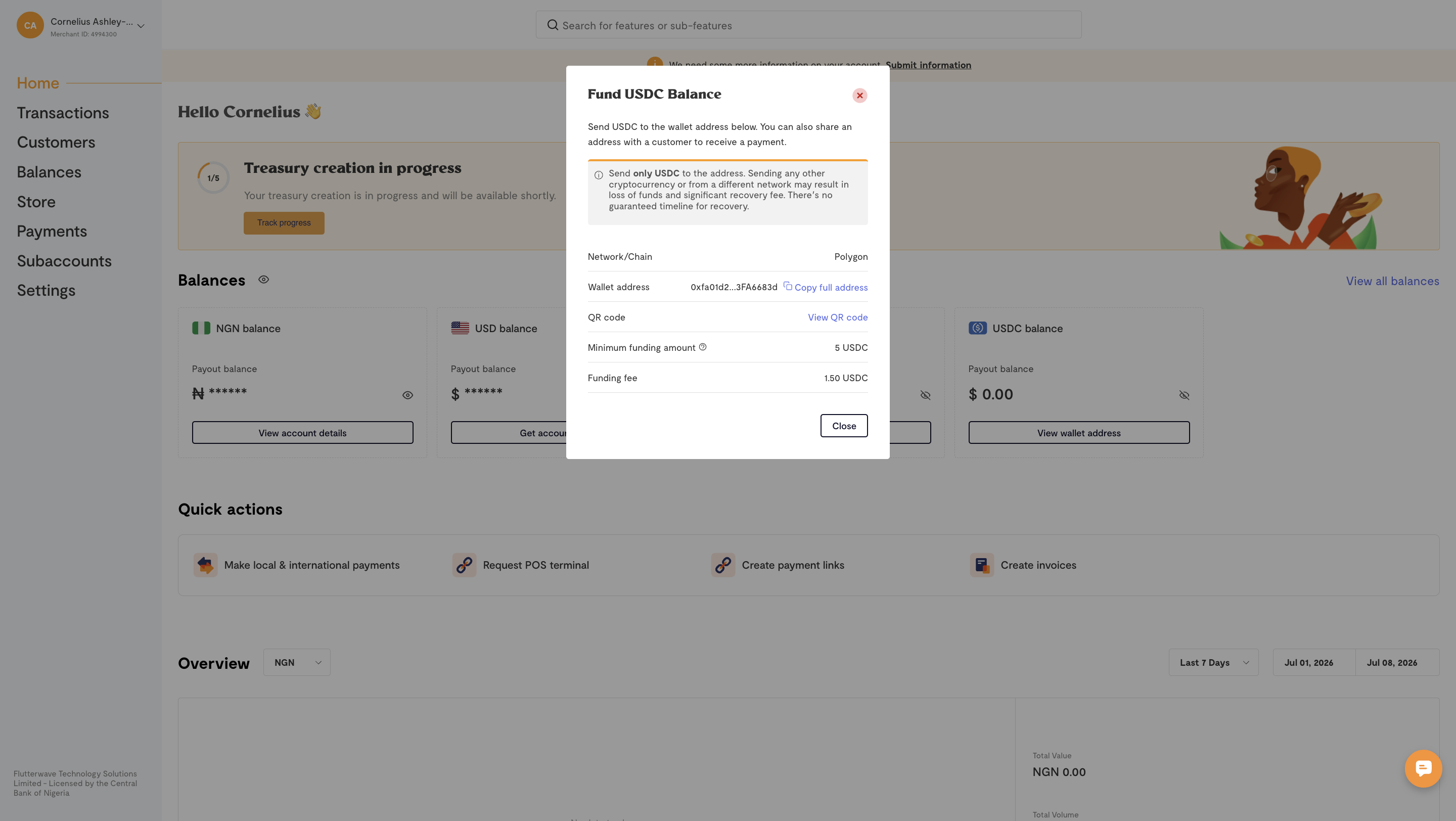
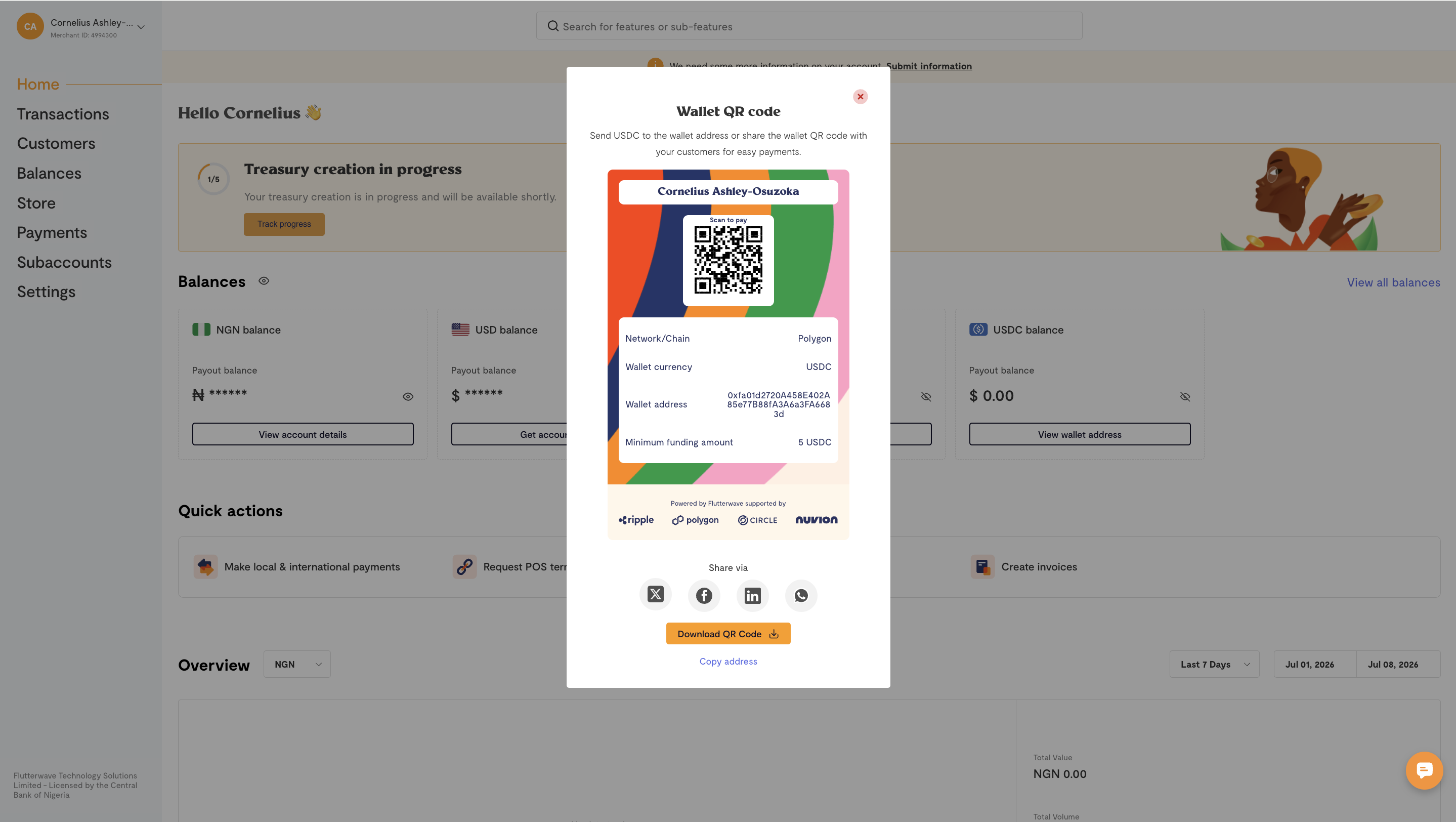
To receive payments into your Stablecoin wallet:
-
Get your wallet address from your dashboard or balance section.
-
Share your wallet address with others to receive payment.
-
Receive notifications for successful payments into your
USDT,USDCandRLUSD.
Transaction fees
You'll need to retrieve the transaction fees before initiating your transfers. Query the transaction fees endpoint using the amount and stablecoin to get the current fees.
curl --location 'https://api.flutterwave.com/v3/transfers/fee?amount=50¤cy=USDT&type=crypto' \
--header 'Authorization: Bearer YOUR-SECRET-KEY'{
"status": "success",
"message": "Transfer fee fetched",
"data": [
{
"currency": "USDT",
"fee_type": "value",
"fee": 1.5
}
]
}Unlike fiat transfers, the transfer fee is removed from the transfer amount; e.g., for a 50 USDT transfer with a 1.5 USDT fee, the recipient receives 48.5 USDT (the remainder after the fee has been deducted from the transfer). For these types of transfers, a flat rate of USDT 1.5 is applied to the transfer.
For cross-currency transfers, i.e. transfers whose debit_currency is fiat, the fee is debited from your fiat balance, not your stablecoin balance. These transfers have a percentage-based fee to account for changes in exchange rates.
curl --location 'https://api.flutterwave.com/v3/transfers/fee?amount=50¤cy=USDT&type=crypto&debit_currency=NGN' \
--header 'Authorization: Bearer YOUR-SECRET-KEY'{
"status": "success",
"message": "Transfer fee fetched",
"data": [
{
"currency": "USDT",
"fee_type": "percentage",
"fee": 0.75,
"fee_amount_in_fiat_currency": 1062.585,
"fee_amount_in_crypto_currency": 0.75,
"amount_minus_fee": 49.25
}
]
}Best Practices
- Always verify the recipient's wallet address. It should be accurate and operate on our supported networks.
- Query and calculate the transfer fees before you initiate a transfer. Fees are deducted from the transfer amount.
- Check your wallet balance before initiating any payment to prevent failed transfers.
- Configure alerts on your account to prevent your wallet balance from running out.
Updated 5 days ago